




XTB now offers options trading to eligible clients in selected markets, giving traders access to call and put options on shares of major US companies. These options give traders exposure to individual stocks without having to buy the underlying shares. However, options are not currently available to all XTB clients, so your country and the XTB entity you register with are important factors to consider.
In this guide, we will cover everything traders need to know about XTB options trading, including where the service is available, the trading costs, and a walkthrough of the process of placing a trade.
What Are Options at XTB?
At XTB, options are financial derivatives that allow traders to gain exposure to the price movements of an asset, such as a US company’s stock, without actually buying or selling the underlying shares. XTB offers two main types of options:
- Call options - A call generally gains value when the price of the underlying asset rises above the option's strike price. Traders typically use calls when they expect the underlying asset to increase in value.
- Put options - A put generally gains value when the price of the underlying asset falls below the option's strike price. Traders typically use puts when they expect the underlying asset to decline.
Each XTB option has a strike price and expiration date. The strike price is used to determine the option's value relative to the current price of the underlying asset, while the expiration date determines when the contract ends.
When you open an options position with XTB, you pay the option's quoted price, known as the premium. The value of the position can then change as the price of the underlying asset moves. Factors such as the time remaining until expiration and market volatility also affect the option's price.
Importantly, options are cash-settled at XTB. This means that you do not exercise the option to buy or sell the underlying shares. Instead, any resulting profit or loss is settled in cash based on the terms of the option. This makes XTB's options different from traditional physically settled stock options, where exercising the contract can result in the actual delivery or purchase of shares.
Where Is XTB Options Trading Available?
XTB introduced options trading at the beginning of 2026. It currently offers options trading on 110 U.S.-listed stocks and exchange-traded funds (ETFs) across several European markets. XTB options trading is available in:
- Cyprus
- Germany
- Spain
- France
- Portugal
- Czech Republic
- Slovakia
Outside of these countries, options trading is not available through XTB. However, traders in Poland will soon have access to this asset class. The broker is waiting for the KNF’s approval before adding this offering to Polish traders.
Therefore, having an XTB account does not automatically mean that you will have access to options. Your eligibility depends on the country where you are a resident and the XTB entity servicing your account. You can also contact XTB’s customer support to confirm whether the product is available in your jurisdiction if you are unsure.
Step-by-Step Guide to Trading Options on XTB
The process of trading options on XTB is relatively straightforward.
Step 1: Open an XTB Account
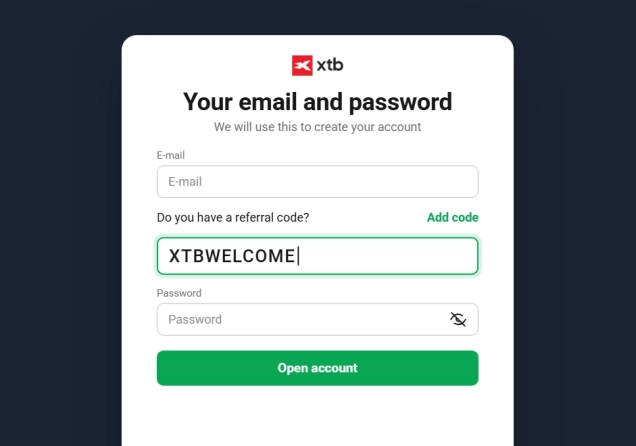
To get started, navigate to the XTB website or download the mobile app and click on Create Account. Enter your personal details, including your email address, country of residence, and a secure password. During registration, XTB may ask questions about your financial situation, investment objectives, experience and knowledge. These questions assist the platform in assessing whether the financial products they offer align with your risk profile.
Trading options is risky and may result in the loss of capital. Please refer to the KID. Invest responsibly.
69-80% of retail investor accounts lose money when trading CFDs with this provider.
Step 2: Verify Your Account
Regulatory compliance requires XTB to verify your identity before enabling full platform features. This Know Your Customer (KYC) process involves uploading a government-issued ID, such as a passport or national ID card, and proof of address, like a recent utility bill or bank statement. Verification is often completed within minutes once documents are submitted correctly.
Step 3: Deposit Funds
After your account is verified, you need to fund it. XTB offers several methods, including bank transfers, credit/debit cards, and e-wallets like PayPal and Skrill. Choose your preferred method, specify your deposit amount, and complete the transaction. Your available balance will update as soon as the payment processes.
Step 4: Open the Options Market in XTB
On the XTB web platform or mobile App, go to the Markets section and tap the Options tab at the top. This will show you a list of US stocks and ETFs that have options available. Tap the stock you want to trade options on.
Step 5: Set Your Option Parameters
After selecting the option to trade, you will land on the order screen. Here you can configure several key parameters.
- Choose Option Type (Call or Put) - If you expect the price of the underlying asset to rise, you would choose a Call option. If you expect it to fall, you would choose a Put option.
- Select the Expiration Date - This is the date on which the option contract ends. XTB offers various expiration dates, which allow traders to react to short-term market events.
- Set the Strike Price - This is the predetermined price at which the option can be exercised. The relationship between the strike price and the current market price determines if an option is "in the money," "at the money," or "out of the money," which directly affects its premium.
Step 6: Place Your Order
After selecting your preferred parameters, you will see the premium. This is the price you must pay to buy the option contract. Review this premium and any applicable XTB trading costs. Once you are satisfied with the details, enter your desired position size and submit the trade.
XTB Options Trading Fees
Fees are an important consideration because the cost of entering an options position affects your potential return. XTB does not charge a separate commission or overnight fee on options. Instead, it applies a 0.25% markup on the exercise price, which is built into the premium you pay. You pay it when you open the position and again on the same basis when you close, so the round trip cost is roughly 0.5%.
It is also worth separating the premium itself from XTB's markup. The premium is the market price of the option, and according to XTB, it is shaped by several factors. The closer the strike price sits to the current price of the underlying, the more expensive the premium, and the further away it sits, the cheaper.
Volatility matters too, so for a move of the same size, an option on Berkshire Hathaway or Coca-Cola will price very differently than one on Nvidia or Meta. Interest rates and, with stocks, dividends also feed in, as does time to expiration, since less time left means a lower chance of a significant move. XTB's markup then sits on top of that pricing. Costs can differ depending on which XTB entity holds your account, so check the current fees before you trade.
XTB Options Trading Example
Let's walk through buying a Call option on AMD using the XTB mobile app. This is an illustrative example only and not a recommendation to trade AMD or any other asset. Open the XTB app and go to Markets. Tap the Options tab at the top. You’ll see a list of stocks and ETFs with options available.

Search for and select AMD - Advanced Micro Devices. On the AMD options screen, you’ll first choose your direction and review the payoff. For this example we’ll buy a Call.
The app will show you a payoff chart so you can see potential outcomes. Below the chart you’ll see fields to set the expiry date and strike price.

Tap Expiry date to see the available options. XTB lists several expiries with the number of days remaining shown next to each. Shorter expiries are cheaper but leave less time for the price to move, while longer expiries cost more premium but give the trade more room.

Next, tap Strike to open the strike list. Each strike shows the strike level, break even, and premium. For this trade, we’ll select Call $487.50. The Premium will be $9.424 and the break-even price $496.924

After choosing strike and expiry, set your order size. Then tap the trade option button to submit your order. That’s it. The premium and potential profit or loss will depend on the amount invested, so the figures shown in the app will change if you use a different investment amount. Once you are satisfied with the details, tap the Trade option button to submit the order.
XTB options are cash-settled, so you do not receive AMD shares if the option is profitable at expiry. Instead, any profit or loss is credited or debited to your account in cash. You also do not have to wait until expiry to close the trade. You can close the position earlier if you choose, with the amount you receive or pay depending on the option's price at that time.
If you hold the option to expiry, the result depends on where AMD trades on that date. Above the $496.924 break even the trade would be profitable before applicable trading costs, and below it the trade would result in a loss.
XTB’s Credibility
Before trading, it is essential to verify any broker's credibility. XTB is a well-established and highly reputable broker with more than 15 years of industry experience. The company is regulated by several respected authorities, including the CySEC in Cyprus, the KNF in Poland, and the FSC in Belize, among others. XTB is also a listed company on the Warsaw Stock Exchange. This requires it to meet strict transparency and corporate reporting standards, which further helps its credibility.
Therefore, XTB may be worth considering if you are looking to trade selected US equity options through a multi-regulated broker. However, remember that options are currently available only in selected XTB markets.
Final Comments
XTB options trading gives eligible clients in selected countries access to call and put options on major US companies. The service is relatively new, and availability depends on the XTB entity serving your account. Before trading, check whether options are available in your country. The costs are also worth considering, so check what fees apply to your account.
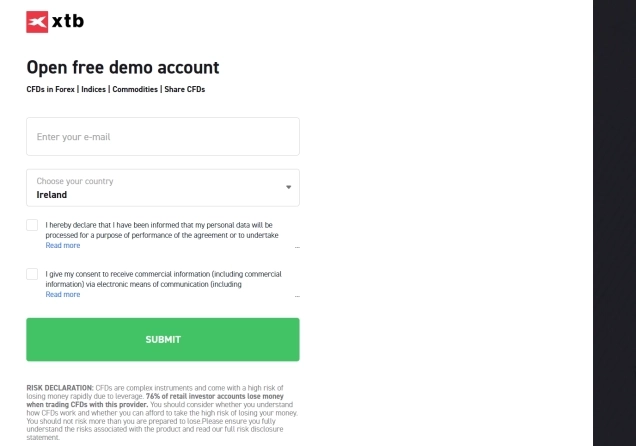
If you are new to options, consider using XTB's demo account to practise trading before committing real money. Most importantly, make sure you understand the potential risks and that any options trade is appropriate for your financial situation and risk tolerance.



Top-Tier Trusted Brokers
The table below contains links to 3rd party websites of our top partners from whom we receive compensation at no additional cost to you.