










XTB Account Opening - Step-by-Step Guide
XTB is one of the world’s largest and most established forex and CFD brokers, with over 20 years of industry experience. Listed on the Warsaw Stock Exchange and regulated by multiple top-tier authorities, XTB has built a strong reputation for transparency, reliability, and client-focused services. The broker offers access to over 10,100 financial instruments from various asset classes.
Positively, opening an account with XTB is a streamlined process, designed to accommodate traders of all experience levels. Whether you want to practice with a risk-free demo account or dive into live trading with real funds, XTB ensures a seamless onboarding experience.
This step-by-step guide will walk you through the XTB account opening process for both demo and live trading accounts.
Demo vs Live Account
Before beginning the account opening process, it's crucial to understand the key differences between a demo and a live account. This distinction helps traders choose the right starting point for their trading journey.
- Demo Account - A demo account provides a risk-free environment where traders can practice strategies using virtual funds. It is a perfect tool for traders to practice strategies, get familiar with the platform, and learn about market dynamics without any financial risk. XTB's demo accounts aim to mirror real market conditions, providing a realistic training ground.
- Live Account - A live account is where you trade with real money in actual market conditions. This means your profits and losses are real. Factors like slippage and spread changes during high volatility are part of the reality of live trading. As such, it requires a well-disciplined strategy with careful risk management.
In summary, a demo account is for learning and testing, while a live account is for those ready to trade with real capital. XTB offers both to cater to different levels of experience. Let’s go through the steps to open each of these, starting with how to open a demo account.
Opening an XTB Demo Account
Setting up an XTB demo account is a quick process that doesn't require any financial commitment. Follow these steps to get started:
Step 1: Visit the XTB Website
Navigate to the official XTB website (xtb.com). On the homepage, locate the Try Demo button, typically found at the top-right corner of the page. Click on it to start the process. Please note that if XTB does not accept clients from your country, it will not let you proceed beyond this point.
69-80% of retail investor accounts lose money when trading CFDs with this provider.
Step 2: Provide Basic Details
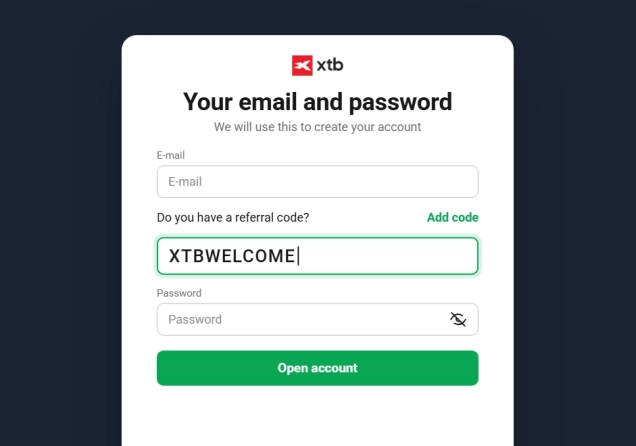
You will be redirected to a page that will require you to provide some information about yourself. Here, you will provide your email address and select your country of residence. In this step, you will also be asked if you have a referral code. If you wish, you can enter our XTB referral code XTBWELCOME to receive additional registration bonuses, including an interview with Singapore’s wealthiest professional forex trader, as outlined in our dedicated article.
Make sure you read, understand, and agree to the terms and conditions before you proceed.

Step 3: Complete the Demo Registration Form
The next page will require some additional information from you. You will enter your name, phone number, and set a password.
Step 4: Start Trading with Virtual Funds
That’s it. Once you complete the previous section, a demo account will be created for you. You will receive the credentials you need to connect to xStation 5, XTB’s proprietary trading platform.
The account lasts 30 days and comes with $100,000. Traders can prevent their demo accounts from expiring by creating a real trading account. Real account holders can also adjust the balance of their demo accounts when they please. Here’s how to create a real trading account on XTB.
Opening an XTB Live Trading Account
Once you feel ready to trade with real funds, you can open a live account with XTB. The process is simple and typically takes only a few minutes. Follow these steps to get started:
Step 1: Visit the XTB Website
Go to the official website xtb.com and locate the Create Account button at the top right corner of the homepage. Click on it to begin the process.
69-80% of retail investor accounts lose money when trading CFDs with this provider.
Step 2: Provide Basic Details
Just like with the demo account, you will be redirected to a page that will require you to provide some basic information. You will provide your email and select your country of residence. Read, understand and agree to the terms before clicking to continue.

Step 3: Set a Strong Password
The next step will require you to set a password for your account. Make sure the password you set is at least 8 characters long and contains at least one uppercase letter and one number.
Step 4(a): Complete Real Account Registration Form
You will then land on a page where you will enter your name, provide your phone number, and date of birth. After that, you will need to tick the box that declares that you are not a US person. Finally, you will provide some information about your financial background. This will include your annual net income, value of savings and liquid investments, the annual value of the planned investment, and the main source of income and savings. Once you fill these out, click on Next Step to continue.
Step 4(b): Provide Your Address
You will be taken to a page that will request your address. Make sure you provide accurate information, as it will help speed up the verification process.
Step 4 (c): Select Account Currency
The next step of the process is to select your account currency and preferred language. You will also be able to apply a referral code (partner code) if you have one.
Step 5: Agree to Terms and Conditions
On the next page, you will be provided with links to different XTB policy documents. Make sure you read all of them and understand the terms before agreeing.
Step 6: Verify Account
When you agree to all the terms, you will be taken inside your newly created account. However, before you can do any actual trading with it, you will be required to verify it. To comply with KYC (Know Your Customer) and AML (Anti-Money Laundering) laws, XTB requires you to verify your identity.
To complete this step, you will need to upload a valid government-issued photo ID (like a passport or national ID card) and a proof of address document (such as a utility bill or bank statement).
Step 7: Fund Your Account and Start Trading
Once verified, log in to your account and fund it using one of XTB’s supported payment methods. The broker supports a variety of payment methods, including bank transfers, credit/debit cards, and electronic wallets such as PayPal, Neteller, and Paysafe. There is no minimum deposit requirement, meaning that traders can deposit whatever amount they are comfortable with.
What XTB Offers to Traders
XTB has established a solid reputation in the trading industry by offering access to an impressive range of more than 10,100 financial instruments. Its product portfolio covers CFDs on forex, commodities, indices, cryptocurrencies, stocks, and ETFs. Traders can also access real stocks and ETFs. The only trading platform available to use is the broker’s proprietary xStation 5, available across web, desktop, and mobile devices for flexible access.

The broker follows a simple and transparent pricing structure. Its standard account is designed to suit traders at all experience levels, featuring tight spreads that start from just 0.8 pips with no commission on forex trades. For Muslim traders, XTB also provides an Islamic account, which eliminates swap charges.
XTB’s Credibility
XTB is a well-established broker with over 15 years of experience in the financial markets. It is regulated by multiple respected authorities, including the FCA in the UK, the CySEC in Cyprus, the KNF in Poland, the DFSA in Dubai, and the FSC in Belize. In addition, XTB is publicly listed on the Warsaw Stock Exchange. This is a status that requires the company to maintain high standards of transparency and accountability.
The broker also holds a strong reputation among its clients. On Tustpilot, XTB holds a 4.1-star rating out of 5, after over 2,100 reviews. With its combination of robust regulation, transparent operations, and positive client feedback, XTB continues to be a top choice for traders around the globe.
Closing Remarks
Opening an account with XTB is a straightforward and user-friendly process, designed to cater to traders of all experience levels. Whether you opt for a risk-free demo account to hone your skills or a live account to trade with real funds, XTB provides a seamless onboarding experience.
With a demo account, you can explore the platform and practice your trading strategies risk-free. Once you're comfortable, the transition to a live account is seamless, giving you access to XTB's extensive range of over 10,100 financial instruments.
As a publicly-listed company regulated by top-tier authorities, XTB offers a highly secure environment for trading. Overall, XTB combines reliability, transparency, and accessibility. By following the step-by-step guide outlined above, you can confidently open your account and take the next step in your trading journey with the broker.



Top-Tier Trusted Brokers
The table below contains links to 3rd party websites of our top partners from whom we receive compensation at no additional cost to you.