









Pepperstone API - Everything You Should Know
In the world of online trading, speed, customisation, and reliability are paramount. The ability to build and implement a custom trading system can give traders a competitive edge, as it allows them to use strategies that are unique and highly specific. In such cases, APIs become invaluable tools that help traders connect their custom-built systems to a broker’s platform.
Pepperstone, a leading forex and CFD broker, offers two powerful APIs to its clients, enabling them to connect directly to the broker's trading infrastructure. In this guide, we’ll explore the Pepperstone API, including its features, benefits, and how traders can leverage it for automated trading strategies.
What is a Trading API and How Does It Work?
An API (Application Programming Interface) is a set of protocols and tools that allows different software systems to communicate with each other. In trading, APIs enable traders, algorithms, and third-party applications to interact with a broker’s platform to execute trades, access market data, and manage accounts programmatically.
For algorithmic traders, this means they can create custom applications in programming languages like Python or C#. The API then sends commands from the trader's program to Pepperstone's servers for execution. This level of control is essential for strategies that require high-speed, high-volume trading or specific data analysis that a standard platform may not support. Here are the key benefits of the Pepperstone API.
Pepperstone API Options
Pepperstone primarily provides access to two different APIs, including its FIX API and the cTrader API. The FIX API is mainly built for institutional and high-frequency traders, including those running scalping systems or quantitative models, among other strategies. It offers ultra-low latency execution with fewer intermediaries and provides direct access to Pepperstone’s liquidity providers.
On the other hand, the cTrader APi is designed for retail and professional traders who want flexibility. This API enables integration with custom trading applications, signal services, or dashboards. It supports multiple programming languages, including C# and Python, among others. With this API, traders get access to real-time price feeds and trade execution.
74.1% of retail CFD accounts lose money
Key Benefits of Pepperstone’s APIs
Regardless of which API you use, Pepperstone’s offerings provide several key benefits:
- Enhanced Market Data - The APIs allow for a greater ability to see the depth of the market, giving you a more complete picture of real-time supply and demand. This data is critical for advanced strategies that rely on detailed market analysis.
- Customisation and Flexibility - Both the FIX and cTrader APIs are ideal for traders who want to build custom-built systems. You can create your own front-end solutions, backtesting environments, and sophisticated trading algorithms.
- Access to Deep Liquidity - Pepperstone provides access to multiple liquidity providers, which helps ensure competitive pricing and minimal slippage. By connecting via the APIs, traders can take full advantage of this deep liquidity for efficient order execution.
- Low Latency Execution - For automated trading, every millisecond matters. Pepperstone's APIs are designed for fast, efficient trade execution, which can be a significant advantage in volatile markets.
Who Can Use Pepperstone’s APIs?
While both Pepperstone APIs offer powerful tools for automated trading for all traders, they are generally geared toward specific types of traders. API access is typically for experienced and high-volume traders who possess the technical skills to develop their own systems.
Pepperstone specifies that its FIX API is available to current account holders with a minimum trading volume of €160 million or AUD$250 million per month.
The cTrader API, while still powerful, is more accessible and commonly used by retail traders.

Connecting to Pepperstone APIs
Setting up Pepperstone APIs is a straightforward process for eligible traders. Here’s a step-by-step guide to get you started:
Step 1: Open a Pepperstone Account
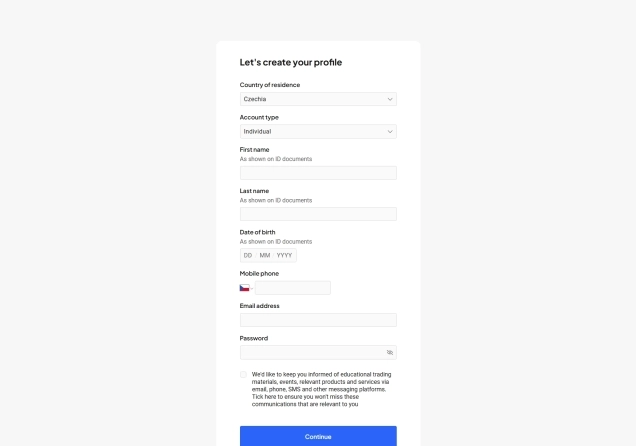
If you’re not already a client, sign up for a trading account on the Pepperstone website. You’ll start by filling out a form with your personal information, then you’ll set up your live account by selecting your trading platform, base currency, and account type. After that, you will take a suitability test and verify your account by providing a government-issued identification document and proof of address documents.
74.1% of retail CFD accounts lose money
Step 2: Request API Access
You will need to contact Pepperstone’s support team to discuss your needs and request API access. Remember, Pepperstone gives access to its FIX API to traders with a minimum monthly trading volume of AUD$250 million, while the cTrader API is more widely available. As you trade, continuously check your account status by logging into your Pepperstone Client Area to see if you meet the requirements for both APIs. Once approved, you will receive the necessary credentials to authenticate your connection.
Step 3: Integrate and Start Trading
Use the API documentation to connect your trading system. Before going live, it is crucial to thoroughly test your system in a demo environment to ensure it functions as intended and to make any necessary adjustments.
What Pepperstone Offers Beyond the APIs
Beyond its API offerings, Pepperstone is widely respected in the forex industry. The broker is known for its competitive spreads and a choice of trading platforms, including MT4, MT5, cTrader, and TradingView, alongside its proprietary Pepperstone Trading Platform. Pepperstone provides a diverse selection of trading instruments, including CFDs on forex, indices, commodities, currency indices, cryptocurrencies, stocks, and ETFs. In total, the broker provides access to over 1,400 different products.
When it comes to trading costs, the broker maintains a competitive edge with its transparent and cost-effective pricing structure. The Standard account comes with spreads from 1.0 pips and no commission. In comparison, the Razor Account provides raw spreads from 0.0 pips with a low commission fee that varies depending on the trading platform used.

For MetaTrader 4 or MetaTrader 5 users, the commission is $3.50, €2.60, £2.25, or CHF 3.30 per side per lot, based on the account currency. The same $3.50 per side per lot fee applies to those trading on TradingView and the Pepperstone Trading Platform. Meanwhile, cTrader users benefit from slightly lower fees, with a commission of $3.00 per side per lot.
For traders using TradingView, cTrader, or the Pepperstone Trading Platform in a currency other than USD, all commission charges are automatically converted to the account’s base currency at the current spot exchange rate.
Finally, Pepperstone demonstrates regulatory adherence by holding licenses from multiple respected financial regulators. The broker has regulation and authorisation by the FCA in the UK, the CySEC in Cyprus, the ASIC in Australia, the BaFin in Germany, the CMA in Kenya, and the DFSA in Dubai, among others.
Final Comments
The Pepperstone API offers traders a powerful way to enhance their trading performance, flexibility, and control. It allows traders to access deep liquidity, execute high-speed trades, and develop fully customised trading solutions. While the FIX API is tailored for high-volume traders, those who gain access can implement advanced strategies with precision and efficiency. Alongside its own FIX API, the broker also offers the cTrader APi, which allows investors to connect to this powerful trading platform and deploy customised applications.
Beyond its APIs, Pepperstone remains a globally popular broker with several appealing features. The broker offers a wide range of instruments, multiple trading platforms, and competitive costs under strong regulatory oversight. Remember to test out any platforms you intend to use in a demo environment before going live.



Top-Tier Trusted Brokers
The table below contains links to 3rd party websites of our top partners from whom we receive compensation at no additional cost to you.