











How to Open a Live Account on cTrader
cTrader has emerged as one of the leading trading platforms in the forex and CFD industry. The platform is known for its sleek design, lightning-fast execution speeds, transparent pricing, and advanced order capabilities. Today, several top-tier brokers offer cTrader as part of their trading platform suite, giving clients access to powerful features like Level II pricing, advanced charting, and automated trading through cBots.
To begin live trading on cTrader, you must first open a real account with a broker that provides direct access to the platform. So, how do you actually open a live trading account on cTrader? In this guide, we will detail how to open a live account on cTrader, covering the whole process from choosing a broker to the point of trading.
Steps to Open a Real cTrader Account
Step 1: Choose a Reliable cTrader Broker
The first and most critical step in opening a live cTrader account is selecting a trustworthy broker that supports the platform. Not all brokers offer cTrader, so you’ll need to focus on those that do. When choosing a broker, consider the following key factors:
- Regulation - Prioritise brokers that are regulated by reputable financial authorities. This provides a layer of security and ensures that the broker adheres to strict financial and operational standards. Examples of top-tier regulators include the FCA (UK), the ASIC (Australia), and the CySEC (Cyprus).
- Trading Costs - Look for a broker with competitive spreads and commissions. cTrader is often associated with ECN accounts, which typically feature very tight spreads (sometimes as low as 0.0 pips) but charge a commission on each trade. Make sure the broker you choose aligns with your budget.
- Tradable Instruments - Verify that the broker offers the specific assets you wish to trade, such as forex pairs, commodities, indices, or cryptocurrencies. The more assets that a broker offers, the easier it is for traders to build a diversified portfolio.
Beyond these core factors, also consider deposit/withdrawal methods, minimum deposit requirements, customer support quality, and the availability of a demo account. A number of reputable brokers support cTrader, including Pepperstone, FP Markets, IC Markets, and FxPro.
For this guide, we will use Pepperstone, a globally recognised broker known for its excellent cTrader conditions, as our example. The process is largely similar across other cTrader brokers.
Step 2: Registration and Application
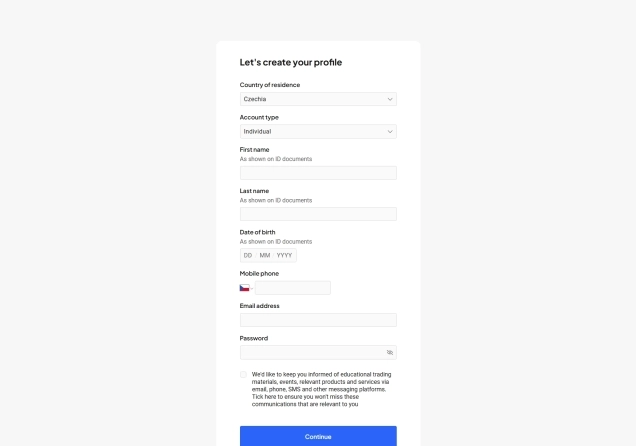
To get started with Pepperstone, you'll need to fill out their online application. The process is straightforward and involves the following steps:
- Go to the official Pepperstone website www.pepperstone.com and click on the Join Now button at the top right corner of the homepage.
- You will be directed to an online application form where you’ll need to provide personal details, including your full name, date of birth, mobile number, email, and password. Ensure all information is accurate, as Pepperstone will verify it during the KYC process.
- During the application, you'll be asked to select your preferred trading platform. This is where you'll choose cTrader.
- You'll also need to select your desired account type and choose your account base currency. Pepperstone offers two main accounts, which include the Standard Account and the Razor Account.
74.1% of retail CFD accounts lose money

Step 3 (a): Application Process
Pepperstone will ask you to answer a short set of questions to assess your trading knowledge and risk awareness. This step helps the company ensure that trading leveraged products is appropriate for you.
Step 3(b): Provide Additional Information
After the questionnaire, you’ll need to complete details such as your residential address, financial background, and employment status. You’ll also be asked to agree to Pepperstone’s terms and conditions.
Step 3(c): Account Verification
As a regulated broker, Pepperstone must verify your identity to comply with anti-money laundering (AML) and know-your-customer (KYC) regulations. To complete this step, you’ll need to upload:
- Proof of Identity (POI): This can be a valid passport, national ID card, or driver's license.
- Proof of Address (POA): This can be a recent utility bill, bank statement, or credit card statement issued within the last three months.
Pepperstone generally requires clear colour images (not black-and-white scans). Depending on your location, they may request extra documentation. Once you have submitted your documents, the broker's compliance team will review them. This process can take anywhere from a few hours to a couple of business days. You will receive a confirmation once your account is verified.
Step 4: Downloading and Installing cTrader
Once your account verification is complete, the next step is to download and set up the cTrader platform. Begin by logging in to your Secure Client Area on the Pepperstone website using your registration details and requesting a live cTrader account. Pepperstone will then send you an email containing your login credentials.
From the client area, click on the Trading Platforms button and select cTrader. Make sure you choose the version compatible with your device, whether it’s Windows, macOS, iOS, Android, or the web-based platform. After the download is finished, double-click the downloaded file and follow the on-screen installation instructions.
Once installed, you'll need to connect it to your Pepperstone account. To do this, open the cTrader platform and log in using the account credentials that Pepperstone provided. Alternatively, if you prefer not to install software, you can access cTrader Web directly through your browser.
Step 5: Funding Your Trading Account
Before you can begin trading on cTrader, you will need to fund your new account. This process is straightforward and can be managed entirely through the Secure Client Area. Start by logging in to the Secure Client Area using the credentials you created during registration.
Once inside, navigate to the Funds tab and select Add Funds. You will then need to choose the specific cTrader account you wish to deposit into, which is important if you have multiple trading accounts under the same profile.

Pepperstone supports a wide range of funding methods to suit different preferences. These include credit and debit cards, bank wire transfers, M-Pesa and popular e-wallets such as PayPal, Skrill, and Neteller. After selecting your preferred payment option, simply enter the deposit amount. Pepperstone does not impose a minimum deposit requirement, giving you the flexibility to start with any amount that matches your comfort level and trading strategy.
The speed of deposits depends on the method you choose. Payments made through cards and e-wallets are usually credited instantly, allowing you to start trading right away. Bank transfers, on the other hand, may take a few business days to clear, depending on your location and banking provider. Once your funds appear in the trading account, you will be fully ready to place trades on cTrader.
Step 6: Start Trading on cTrader
Now that your Pepperstone account is verified and funded, and your cTrader platform is connected, you can begin placing trades. The cTrader platform is intuitive and rich with features, but it's always a good idea to familiarise yourself with it on a demo account before risking a significant amount of capital.
This will help you get a grasp on how the platform works, including the interface, charting tools, order types, and other important features. Luckily, Pepperstone offers a non-expiring demo account on cTrader with $50,000 in virtual funds, available in any of the account currencies supported by Pepperstone.
What Does Pepperstone Offer on cTrader?
Pepperstone supports the trading of a diverse range of market products totalling over 1,400 different assets. These include CFDs on forex, cryptocurrencies, indices, currency indices, commodities, and shares.

Regarding the spreads, the two accounts come with different pricing models to support different trading styles. The Standard account features spreads starting from 1.0 pips for major currency pairs, with no commission required. On the other hand, the Razor account offers ultra-tight spreads that start from 0.0 pips with a commission that depends on the trading platform used. For cTrader users, the commission is $3 per side per lot. For non-USD cTrader accounts, the commission is converted to the account’s currency at the current spot rate.
Further, Pepperstone is a licensed broker by a variety of well-known financial authorities. Its operations are under the supervision of the FCA in the UK, the CySEC in Cyprus, the ASIC in Australia, the BaFin in Germany, and the CMA in Kenya, among others.
Why Trade with cTrader?
cTrader has gained a loyal following due to its advanced and transparent trading environment. Below are some of its key features:
Key Features of cTrader
- Intuitive Interface - The platform is known for its clean, modern, and highly customisable design. The platform features light and dark themes alongside support for multiple languages, enhancing user comfort and accessibility.
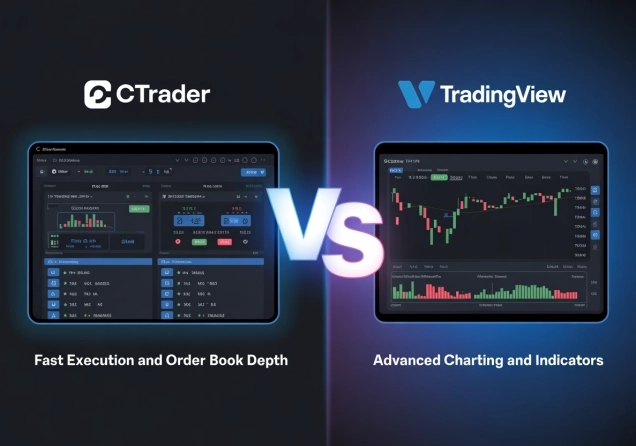
- Level II Pricing - cTrader provides a full depth of market, allowing you to see all executable prices and volumes from liquidity providers. This offers a level of market transparency that's not standard on other platforms.
- Advanced Order Types - It offers a wide range of sophisticated order types, including cTrader's unique Smart Stop Out system, which partially closes losing positions to free up margin and prevent full account liquidation.
- Algorithmic Trading (cBots) - cTrader supports automated trading through cBots, which can be developed using the C# programming language. Unlike MetaTrader's MQL, C# is a more mainstream and versatile language, making it accessible to a larger pool of developers.
- Integrated Copy Trading - The platform includes a built-in social trading feature called cTrader Copy, which allows you to easily follow and copy the strategies of other successful traders.
- Advanced Charting - Traders get access to a wide array of indicators, drawing tools, and customisable charts to perform in-depth technical analysis.
What Other Brokers Support cTrader?
While Pepperstone is one of the most popular choices for cTrader, several other brokers also support the platform. These include:
FP Markets
FP Markets stands out as a top-tier broker, offering the cTrader platform with competitive spreads and a broad range of assets. The broker offers a robust trading environment, which features ultra-fast trade execution and a ton of analysis tools. Traders can access the feature-rich cTrader platform seamlessly on desktop, web, or mobile (Android and iOS).

The broker provides two account options, each with a different pricing model. The Standard account features spreads starting from 1.0 pips with no commission. On the other hand, the Raw account offers spreads as low as 0.0 pips, plus a commission of $3 per side per lot.
FP Markets supports trading in over 10,000 assets, including CFDs on forex, indices, metals, cryptocurrencies, commodities, stocks, bonds, and ETFs. Further, the broker holds licenses from several global regulatory bodies. These include the ASIC in Australia, the CySEC in Cyprus, the FSCA in South Africa, and the CMA in Kenya, among others.
74.73% of retail CFD accounts lose money
IC Markets
IC Markets is a globally renowned ECN broker, offering cTrader for clients seeking raw pricing and rapid execution. The cTrader platform integrates high-speed performance with IC Markets Global’s deep liquidity. This delivers ultra-fast execution, one-click trading, custom indicators through cAlgo, and Level II pricing access.
While IC Markets provides three account types, only the Raw Spread account is available on cTrader. This account delivers spreads starting from 0.0 pips and charges a commission of $3 per side per lot when trading via both cTrader and TradingView.

In terms of asset variety, IC Markets offers access to over 2,200 instruments across various global markets. These include CFDs on forex, indices, cryptocurrencies, commodities, stocks, and futures. Finally, IC Markets operates under multiple regulatory licenses. These include the ASIC, the CySEC, the FSCA, and the SCB in the Bahamas.
FxPro
FxPro is a globally recognised broker that supports multiple platforms, including cTrader. With cTrader, traders benefit from ultra-fast execution, Level II market depth, customisable and detachable charts, as well as powerful automation through cBots and advanced indicators.
cTrader is exclusively available through a dedicated cTrader account, which features highly competitive pricing. On major forex pairs, spreads start as low as 0.2 pips, combined with a commission of $35 per $1 million USD traded.
FxPro is regulated by leading authorities such as the FCA in the UK, the CySEC in Cyprus, and the FSCA in South Africa, reinforcing its credibility and security. Traders can access a wide selection of market products, including CFDs on forex, indices, futures, cryptocurrencies, and shares.
Closing Remarks
Opening a live account on cTrader is a straightforward process that unlocks one of the most powerful trading platforms available today. As we have outlined, the journey starts by selecting a reputable, well-regulated broker like Pepperstone, FP Markets, IC Markets, or FxPro, among others. From there, you need to complete a detailed application process, verify your account, fund it, and finally log in to the platform.
cTrader itself stands out for its modern interface, lightning-fast execution, advanced order types, and powerful automation features. Nonetheless, remember to start with a practice account to familiarise yourself with the platform before risking your own capital.


Top-Tier Trusted Brokers
The table below contains links to 3rd party websites of our top partners from whom we receive compensation at no additional cost to you.