








Plus500 Account Opening - Step-by-step Guide

Plus500 has become one of the most popular CFD brokers globally, with clients in more than 50 countries. The broker is widely recognised for its intuitive proprietary platform and access to a wide variety of market products. These include CFDs on forex, cryptocurrencies, indices, and commodities, among others.
For traders of all levels, Plus500 provides a seamless entry into the financial markets, with a straightforward account opening process. Whether you want to start with a risk-free demo account or dive straight into live trading with real money, Plus500 ensures a user-friendly experience.
This step-by-step guide will walk you through the Plus500 account opening process for both a demo account and a live trading account.
Demo vs Live Account
Before getting started, it’s important to understand the key differences between a demo account and a live account. This is crucial to help traders determine which account best suits their needs at their given stage of trading:
- Demo Account - A demo account is a risk-free simulation environment that provides virtual funds for people to practice trading. It mirrors the live trading environment, allowing investors to explore the platform's features, test trading strategies, and understand how the market works without any financial risk. It is an invaluable tool for traders to build confidence and to familiarise themselves with the broker’s platform.
- Live Account - This is where investors trade with real money. All profits and losses are real and have a direct influence on the trader’s financial situation. Live trading is subject to real-time market conditions, including price slippage and volatility, which can impact performance. These conditions present both opportunities and risks.
In summary, a demo account is perfect for learning and experimentation, while a live account is for those ready to trade with real capital. While a demo account is a great learning tool, it may not fully prepare you for the psychological and emotional aspects of live trading. Here are the steps for opening a demo account:
Opening a Plus500 Demo Account
Opening a demo account with Plus500 is a quick process that requires minimal information. Follow these steps to get started:
Step 1: Navigate to the Plus500 Website
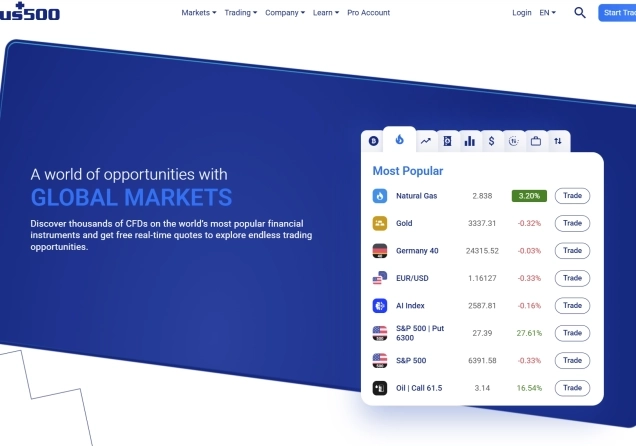
Open your preferred web browser and navigate to the official Plus500 website (www.plus500.com). On the homepage, locate and click on the Start Trading Now or Try Free Demo button to begin the account creation process.
81% of retail investor accounts lose money when trading CFDs with this provider.
Step 2: Choose Demo Mode
After clicking Start Trading Now, you’ll be prompted to select between a demo account and a real-money account. Choose Demo Mode to proceed with a demo account.

Step 3: Complete the Demo Registration Form
You will be presented with a short registration form. This usually requires only your email address and a password to create an account. No personal information is required at this stage, making it an accessible option for immediate exploration.
Step 4: Access Your Demo Account
After submitting the form, you will gain immediate access to your demo trading platform. The account is pre-loaded with a substantial amount of virtual funds for you to practice with. You can start exploring the platform and placing simulated trades right away. The demo account is unlimited and can be reset at any time up to the initial demo amount. This allows traders to continue practising until they’re ready for live trading.
Opening a Plus500 Live Trading Account
A live account allows you to trade with real money and access Plus500’s full range of financial instruments. Trading with real funds involves risks, so ensure you understand these before proceeding. Opening a live account involves a few more steps, but it is designed to be completed online within a short time.
Step 1: Navigate to the Plus500 Website
Visit the official Plus500 website (www.plus500.com) and click on the Start Trading Now button to begin the live account registration process.
81% of retail investor accounts lose money when trading CFDs with this provider.
Step 2: Choose Real Money Mode
After clicking the Start Trading Now button, you’ll be prompted to choose between Demo Mode and Real Money Mode. Select Real Money Mode to proceed with opening a live account.
Step 3: Fill Out the Registration Form
You’ll be directed to an online registration form. You will only need to provide your email and set a password to create the account.
Step 4: Take the Tour
After providing your email and setting a password, you will be redirected to your account, where you will take a quick tour. This is a quick and simple process that guides users through the basics of trading with Plus500. After completing the tour, click on Get Started to continue.
Step 5: Select Country and Currency
The next page will require you to select your country of residence and select your account currency. Select these and click on Next. You will then be prompted to confirm whether your place of birth and nationality are the same as your country of residence.
Step 6: Provide Personal Details
Next, the platform will ask you for your personal details. This will include your name and date of birth. It’s important that all information matches your official identification documents, as Plus500 will verify them during the KYC (Know Your Customer) process.
Step 7: Confirm Your Tax Country
Plus500 will then redirect you to a page that will request you confirm two things. You will need to tick a checkbox to confirm that you pay your taxes only in your country of residence, and another to confirm that you are not a citizen or resident of the United States. Tick both of these boxes and hit Next.
Step 8: Provide Your Residential Address
You will be led to a page that requires you to provide details about your address. This information will include your street name, building number/name, city, and zip/postal code. Provide these details and check the box to confirm your permanent residence is at an address of a municipal or city authority. Click on Next to continue.
Step 9: Take the Appropriateness Test and Select the Target Market
In the next step, Plus500 will assess your suitability for trading the products it offers. You will need to complete a brief questionnaire about your financial situation, trading experience, and investment knowledge. You will also select some of the assets you have traded at least 10-20 times (if there were any) and provide some more information about your employment status.
Step 10: Fill Trader Profile
You will then need to fill out a trader profile by providing information such as the anticipated frequency of your trades, your main investment objectives, your expected investment timeframes, and your risk tolerance.

Step 11: User Agreement
Your account is almost ready at this point. But first, you need to carefully read and understand Plus500’s terms and conditions. When ready, click the checkbox to confirm you have read, understood, and agree with the terms and conditions. Click on Finish.
Step 12: Fund Your Account
Now that your account is ready, you can proceed to fund it. Plus500 accepts a variety of deposit methods, including credit/debit cards, bank transfers, and e-wallets like PayPal and Skrill. The minimum deposit amount on Plus500 is typically $100.
Step 13: Start Trading with Real Money
After funding your account, you can begin live trading across Plus500’s wide selection of CFDs. Please note that as a regulated broker, Plus500 must verify your identity and address to comply with Anti-Money Laundering (AML) laws.
To complete this step, click on Menu and select Verify Account. You will need to upload clear, legible photos of a valid, government-issued ID to verify your identity. You will also need to upload a recent utility bill or bank statement, not older than 3 months, to verify your address.
What Plus500 Offers to Traders
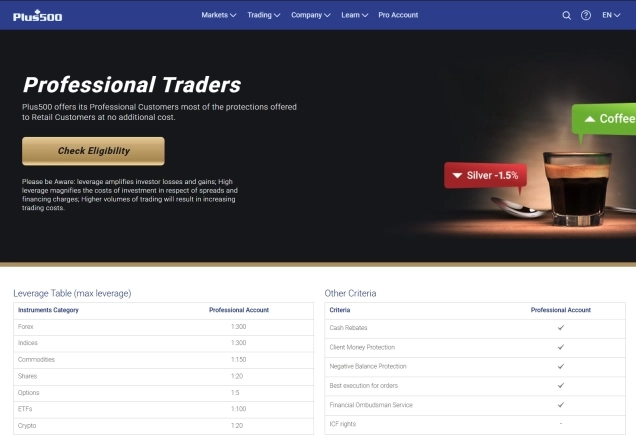
Plus500 provides access to over 2,000 financial instruments, allowing clients to diversify their portfolios. Particularly, traders gain access to CFDs on forex, indices, commodities, shares, options, ETFs, and cryptocurrencies. These are accessible through the user-friendly Plus500 trading platform, available on desktop, web, and mobile devices.

Regarding trading fees, this broker applies a floating spread depending on the asset and market conditions. As an example, the EURUSD pair features a spread of 0.9 pips at the time of writing this. Plus500 does not charge commission fees.
Plus500’s Credibility
Credibility is a critical factor when choosing a broker. Plus500 is a highly regulated and reputable broker, holding licenses from multiple financial authorities around the world. These include the FCA in the UK, the CySEC in Cyprus, the ASIC in Australia, the MAS in Singapore, and the FSCA in South Africa, among others. This multi-regulatory oversight ensures compliance with strict industry standards and promotes fair trading practices.
On top of that, Plus500 is listed on the London Stock Exchange’s Main Market and is part of the FTSE 250 Index. To remain publicly listed, companies must adhere to stringent supervision and pass mandatory, periodic audits. This highlights the broker’s financial stability and transparency.
Further, Plus500 enjoys a strong reputation among traders. On Trustpilot, the broker holds an impressive 4.1 out of 5 rating, based on more than 16,400 reviews. Traders frequently highlight the platform’s ease of use and the responsiveness of its customer support team.
Final Comments
Opening an account with Plus500 is a remarkably straightforward process, reflecting the platform's overall user-friendly design. Whether you start with a demo account or jump directly into a live account, Plus500 makes the process intuitive. The demo account offers a perfect risk-free environment to get acquainted with the system. On the other hand, the live account offers real market exposure to traders who are ready.
Always remember that CFD trading carries a high level of risk and may not be suitable for all investors. It is essential to fully understand the risks involved and never invest more money than you can afford to lose. Use the demo account to build your skills and confidence before committing real capital.

Top-Tier Trusted Brokers
The table below contains links to 3rd party websites of our top partners from whom we receive compensation at no additional cost to you.