



Exness lets traders in several African markets deposit and withdraw with Mobile Money, using the phone number linked to their mobile wallet. Payments are made in local currency, which means less currency conversion. In this guide, we explain how to deposit and withdraw on Exness using Mobile Money, step by step, and what limits, fees and processing times to expect.
Exness Mobile Money Conditions
Exness sets Mobile Money limits separately for each country, so the exact numbers depend on the country registered on your Exness account. The table below summarises what to expect.
| Condition | Exness Mobile Money |
|---|---|
| Minimum deposit | USD 10 |
| Minimum withdrawal | Varies by country; shown in your Personal Area |
| Maximum deposit | Per transaction cap that varies by country; shown in your Personal Area |
| Maximum withdrawal | Per transaction cap that varies by country; shown in your Personal Area |
| Processing time | Processed automatically, without manual review; funds may take longer to arrive depending on your provider |
| Exness processing fees | Free of charge in most supported countries; in some, fees depend on your mobile money provider |
You can see the exact limits for your account in the Deposit and Withdrawal sections of your Exness Personal Area. Your mobile money provider may also apply its own transaction fees and daily limits.
Your capital is at risk. Leveraged products may not be suitable for everyone.
Get Daily Rebates with the Exness Partner Code
If you don’t have an Exness account yet, you can register with the TradingBeasts Exness partner code i5i10zputd before your first deposit. Traders who use it get 35% of the commission Exness pays TradingBeasts back as a daily rebate. The commission comes from both spreads and commissions, on all Exness account types: Standard Cent, Standard, Pro, Raw Spread and Zero.
Rebates are not paid automatically, so you need to request them. You can find the full details in our Exness partner code guide.
How to Deposit on Exness Using Mobile Money
Before you start, make sure your mobile wallet has enough balance and is registered in the same name as your Exness account. Then follow these steps.
- Log in to your Exness Personal Area, open the “Deposit” section and click “Mobile Money”.
- Select the trading account you want to fund, enter the deposit amount within the limits shown, choose the currency and click “Next”.
- Check the transaction summary and click “Confirm Payment”.
- Select your mobile money provider if asked, enter your phone number (and your name, if requested) and click “Pay”.
- Open the payment prompt or message sent to your phone and approve the payment. The exact steps depend on your provider.
- You will receive a confirmation on your phone, and the funds will show in your trading account once the payment is processed.

If Mobile Money is not listed in your Personal Area, it may be under maintenance in your country or unavailable for your account. Exness says payment method availability depends on your registered country, your verification status and the provider’s current availability.
How to Withdraw from Exness Using Mobile Money
Withdrawals work in a similar way. Use the same phone number you deposited with, or the transfer will not go through.
- Log in to your Exness Personal Area, open the “Withdrawal” section and click “Mobile Money”.
- Select the trading account you want to withdraw from, choose the currency, enter the amount and click “Next”.
- Check the transaction summary, enter the verification code sent to you by email or SMS (depending on your security type) and click “Confirm”.
- Enter your registered mobile money number including your country code, add the name of the number’s owner and click “Confirm”.
- A confirmation page will appear, and the funds will be sent to your mobile wallet.
Keep in mind that the most you can withdraw at any time is your trading account’s free margin, and that your mobile wallet must be registered to the exact full name on your Exness account. Otherwise, the withdrawal will fail.
Pros and Cons of Using Mobile Money on Exness
Pros
- No bank account needed: You can fund your trading account with just a phone and an active mobile wallet.
- Local currency: Deposits and withdrawals are made in your local currency, which reduces conversion costs.
- Low minimum deposit: You can deposit from USD 10.
- Automatic processing: Most transactions are processed automatically, without waiting for manual approval.
Cons
- Per transaction caps: Maximum deposits and withdrawals are lower than with some other methods, so larger amounts may need several transactions.
- Provider downtime: Mobile Money can be offline for maintenance, and network problems can delay payments.
- Provider fees and limits: Your mobile money provider may charge its own fees or set daily limits.
Exness Trading Conditions and Regulation
Once your account is funded, you can trade CFDs on forex (majors, minors and exotics), metals, cryptocurrencies, energies, stocks and indices. Exness offers five account types, and costs differ between them.
| Account | Spreads | Commission |
|---|---|---|
| Standard Cent | From 0.3 pips on major forex pairs | No commission |
| Standard | From 0.2 pips on major forex pairs | No commission |
| Pro | From 0.1 pips on major forex pairs | No commission |
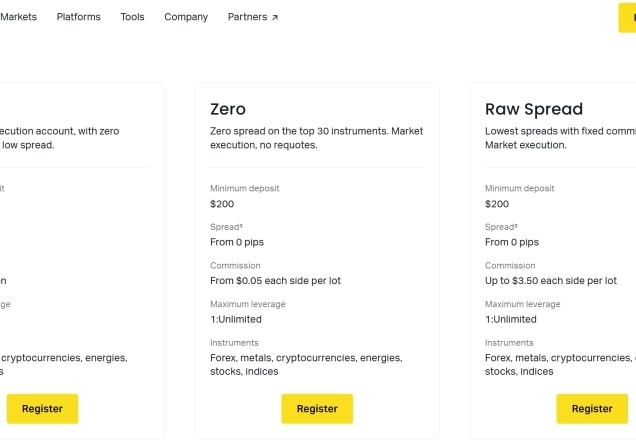
| Zero | From 0.0 pips on the top 30 instruments | From USD 0.05 per side per lot |
| Raw Spread | From 0.0 pips on major forex pairs | Up to USD 3.50 per side per lot |
Exness also charges swaps on positions held overnight, depending on the instrument and position size. Swap-free versions of the accounts are available for Muslim traders.
On the regulatory side, Exness Group entities hold licences from several regulators, including the Financial Services Authority (FSA) in Seychelles, the Financial Sector Conduct Authority (FSCA) in South Africa and the Capital Markets Authority (CMA) in Kenya. The entity you are onboarded with depends on where you register, so check which entity is named in your client agreement before you deposit.
Final Comments
Mobile Money is a simple way to fund an Exness account if you already use a mobile wallet. The minimum deposit is USD 10, most transactions are processed automatically, and Exness lists no processing fees in most supported countries. Before you deposit, check the limits shown in your Personal Area and make sure your wallet is in the same name as your Exness account, since withdrawals go back to the same number.
Your capital is at risk. Leveraged products may not be suitable for everyone.
Frequently Asked Questions
The minimum Mobile Money deposit on Exness is USD 10.
The minimum Mobile Money withdrawal varies by country. Exness has previously listed minimums of between USD 1 and USD 10, depending on the country. These limits can change, so check the Withdrawal section of your Personal Area for the limit that applies to your account.
Mobile Money withdrawals have a per transaction cap that varies by country. Exness has previously listed maximums of roughly USD 245 to USD 1,700 per transaction, depending on the country. The current cap is shown in the Withdrawal section of your Personal Area. You also can’t withdraw more than your trading account’s free margin, and your provider may set its own daily limits.
Exness processes most Mobile Money transactions automatically, without manual review by its payments team. How quickly the money arrives then depends on your mobile money provider. If a transaction is not processed automatically, Exness says it handles it within 24 hours.
Exness lists Mobile Money deposits and withdrawals as free of processing fees in most supported countries. In some countries, the fee depends on your mobile money provider, and providers may charge their own transaction fees.
No. Exness asks you to use the same phone number you used for the deposit, or the transfer won’t go through. The mobile wallet must also be registered to the same full name as your Exness account.
Payment methods depend on the country registered on your Exness account, your verification status and the provider’s current availability. Mobile Money can also be offline temporarily for maintenance, so try again later or use another available method.
Yes. If you register with the TradingBeasts Exness partner code i5i10zputd, you get 35% of the commission Exness pays TradingBeasts as a daily rebate. Rebates are not automatic, so you need to request them.




Top-Tier Trusted Brokers
The table below contains links to 3rd party websites of our top partners from whom we receive compensation at no additional cost to you.